
When machinery stops, hazards don’t. Workers servicing equipment face serious risks—from unexpected startup to residual energy release. A lockout tagout sign in sheet isn’t just paperwork; it’s a critical control point in preventing injuries and meeting OSHA standards. Without it, even routine maintenance can turn fatal.
This document tracks who applied locks, when, and on what equipment—creating accountability and transparency. Yet too many workplaces treat it as a formality, not a frontline defense. That mindset leads to shortcuts, forgotten locks, and near misses. Here’s how to make your sign-in sheet work as hard as your safety protocol demands.
What Is a Lockout Tagout Sign In Sheet?
A lockout tagout sign in sheet is a written record used during maintenance or servicing of machines and equipment. It logs every employee involved in the energy control procedure, detailing:
- Employee name and ID
- Date and time of lock application
- Equipment or energy source isolated
- Type of lock or tag used
- Supervisor approval (if required)
Unlike a lockout device, which physically blocks energy, the sign-in sheet serves as an administrative control. It’s the paper trail that proves compliance when auditors arrive or incidents occur.
Think of it like a flight manifest. Just as airlines track every person on board, facilities must track every worker exposed to hazardous energy. When something goes wrong, investigators don’t guess—they check the sheet.
Why the Sign-In Sheet Is Non-Negotiable
Skip the sign-in sheet, and you’re not just violating OSHA 1910.147—you’re inviting chaos. Consider these real-world consequences:
- Multiple crews working on one machine: Without a log, a night-shift technician might unknowingly re-energize equipment someone else locked out.
- Shift handoffs without communication: Day workers leave locks behind, but night crews assume the machine is safe because no tags are visible.
- Lost or unaccounted locks: A missing lock means no way to verify who applied it, leading to dangerous assumptions.
One Midwest manufacturing plant faced a $127,000 OSHA fine after an employee was injured during cleaning. The investigation revealed no sign-in records existed. The company had locks and tags—but no documentation of their use.
The sign-in sheet closes these gaps. It ensures every action is visible, verifiable, and reversible.
Common Mistakes That Undermine Effectiveness
Even with a form in place, many companies get it wrong. Here are the most frequent failures:
#### 1. Using a Generic Template Off-the-shelf forms often miss site-specific risks. A chemical processing plant needs different fields than a conveyor system in a warehouse. Customize for your equipment types, energy sources (electrical, hydraulic, pneumatic), and shift patterns.
#### 2. Allowing Digital and Paper Copies Simultaneously Dual tracking creates discrepancies. If Jake logs his lock on paper but Maria uses a tablet, someone will miss the full picture. Pick one method and enforce it.
#### 3. Failing to Require Immediate Updates Delays in logging equal risk. A worker applies a lock at 8:03 a.m. but signs in at 9:15 during break. That 72-minute window is unaccounted for. Require entries before work begins.
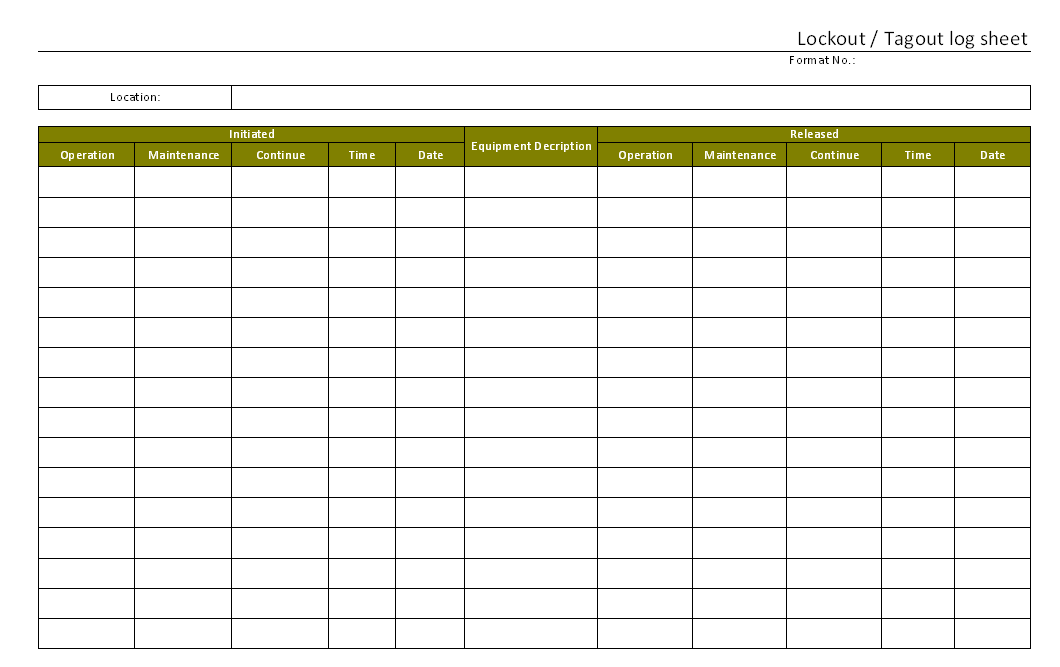
#### 4. Not Storing Sheets Where They’re Visible Sheets buried in binders or filed after the fact are useless during emergencies. Keep them at the lockout station or on a clipboard near the equipment.
#### 5. Letting Supervisors Sign Off Without Verification Approval isn’t a rubber stamp. The supervisor must confirm all locks are in place, all workers are trained, and the machine is fully de-energized.
How to Design an Effective LOTO Sign In Sheet
A good form balances completeness with ease of use. Overcomplicated sheets get ignored. Missing fields create blind spots.
Use this structure:
| Field | Purpose | Example |
|---|---|---|
| Work Order / Job ID | Links to maintenance ticket | WO-8832 |
| Equipment ID | Identifies machine | Conveyor Line 4 |
| Date & Start Time | Marks beginning of lockout | 05/14 07:30 |
| Employee Name & ID | Assigns responsibility | Jane Doe, #1142 |
| Lock Color/Number | Links physical lock to person | Red #7 |
| Energy Isolated | Specifies source (electrical, steam, etc.) | Main power disconnect |
| Tag Number | Cross-references tag details | T-204 |
| Verified By | Confirms supervisor review | M. Rivera |
| Clearance Time | Records when lock was removed | 05/14 11:20 |
Bonus tip: Use color-coded rows or columns by department. Maintenance in blue, production in gray. Visual cues speed up scanning during audits.
When Paper Isn’t Enough: Digital Solutions For high-volume or complex environments, paper has limits. Spilled coffee, torn pages, illegible handwriting—all compromise integrity.
Digital lockout tagout systems offer advantages:
- Real-time sync across shifts
- Automated reminders for lock removal
- Integration with CMMS or EAM platforms
- Audit-ready reports with timestamps
But go beyond basic tablets. The best tools enforce workflow logic. For example, the system won’t let a user log out unless all locks are scanned back in.
Here are five reliable options for managing LOTO sign in data:
| Tool | Best For | Key Feature |
|---|---|---|
| Lockout PRO | Mid to large manufacturers | Cloud-based sign-in with mobile app and barcode scanning |
| iLockout | Facilities with multiple sites | GPS-tagged lock applications and real-time dashboard |
| eFlex LOTO | Automotive and assembly lines | Integrates with production scheduling software |
| SafeSite | Construction and contract work | Supports temporary crews with guest logins |
| Trulock | Regulated industries (pharma, energy) | Full audit trail with OSHA-ready reporting |
Even with digital tools, maintain a fallback. Power outages and network issues happen. A laminated backup sheet at each station ensures continuity.
Real Use Cases: Sign-In Sheets in Action
#### Case 1: Preventing a Fatal Mistake at a Food Processing Plant A technician began disassembling a meat grinder. The sign-in sheet showed two locks applied—one by him, one by a colleague cleaning internal gears. Before rotating the flywheel, he checked the log and called the floor supervisor. The second worker had gone to lunch but forgot to remove his lock. Because the sheet was current, they avoided starting the machine with someone still inside.
#### Case 2: Audit Survival at a Chemical Facility OSHA auditors arrived unannounced. They requested all LOTO records for the past 90 days. The plant used a digital system with encrypted backups. Within minutes, managers pulled up logs showing 137 lockout events—all properly documented. No citations issued.

#### Case 3: The Forgotten Lock in a Paper-Based System At a small warehouse, a mechanic applied a lock to a hydraulic lift, then left for vacation. He forgot to sign the sheet. The next day, another worker assumed the lock was abandoned and removed it. When the original technician returned, he expected the lock to be in place. The equipment was re-energized during inspection—resulting in a crushed hand. The missing signature on the log became a key liability point.
These aren’t hypotheticals. They reflect what happens when sign-in discipline slips.
Integrating the Sheet Into Your LOTO Workflow
A form alone won’t save lives. It must be embedded in the process.
Follow this sequence:
- Preparation
- Identify energy sources and required isolation points. Gather locks, tags, and the sign-in sheet.
- Notification
- Alert affected employees that a shutdown is imminent.
- Shutdown
- Stop the machine using normal controls.
- Isolation
- Disconnect or block all energy sources.
- Verification
- Test for zero energy (e.g., try to start the machine).
- Logging
- Now complete the sign-in sheet. Every participant signs before work begins.
- Service Work
- Perform maintenance or cleaning.
- Clearance
- Remove tools, recheck work area, and verify all workers are clear.
- Unlock & Restart
- Remove locks in reverse order, update clearance time, and restart.
Delaying step 6 undermines the entire chain. Logging isn’t the final task—it’s the gate to safe work.
Compliance Isn’t Optional—But It’s Achievable
OSHA doesn’t mandate a specific sign-in sheet format. But it does require employers to have a written energy control program, including procedures for documenting use of lockout devices.
Your sign-in sheet satisfies that requirement. It’s evidence of due diligence.
To stay compliant:
- Review logs weekly for completeness
- Train new hires on proper use during onboarding
- Audit quarterly—randomly pull 10 sheets and verify against physical locks
- Update forms annually or when equipment changes
And never let convenience override safety. If a 3-minute repair “doesn’t need a log,” you’ve opened the door to normalization of deviance.
A lockout tagout sign in sheet is more than a form—it’s a culture statement. It says every worker matters, every lock counts, and no job is so urgent that safety waits.
Implement one that’s clear, mandatory, and integrated. Audit it. Improve it. Make it impossible to bypass.
Then, when the unexpected happens, you won’t be guessing. You’ll know exactly who locked out, what they isolated, and when it was safe to move forward.
FAQ
What should a lockout tagout sign in sheet include? Name, employee ID, equipment ID, date/time of lock application, energy source isolated, lock/tag number, and supervisor verification.
Do all employees need to sign the sheet? Yes. Every worker applying a lock must be listed to ensure accountability.
Can we use digital sheets instead of paper? Yes, if the system ensures real-time access, prevents edits, and produces secure records.
How long should we keep completed sheets? OSHA recommends at least one year, but check internal policy and industry standards.
Who is responsible for maintaining the sign-in sheet? The authorized employee leading the maintenance activity, typically with supervisor oversight.
Should contractors sign the log too? Absolutely. Any outside worker involved in servicing must be documented.
What happens if someone forgets to sign in? Treat it as a safety violation. Investigate, retrain, and reinforce procedures immediately.
FAQ
What should you look for in Lockout Tagout Sign In Sheet: What It Is and Why It Matters? Focus on relevance, practical value, and how well the solution matches real user intent.
Is Lockout Tagout Sign In Sheet: What
It Is and Why It Matters suitable for beginners? That depends on the workflow, but a clear step-by-step approach usually makes it easier to start.
How do you compare options around Lockout Tagout Sign In Sheet: What It Is and Why It Matters? Compare features, trust signals, limitations, pricing, and ease of implementation.
What mistakes should you avoid? Avoid generic choices, weak validation, and decisions based only on marketing claims.
What is the next best step? Shortlist the most relevant options, validate them quickly, and refine from real-world results.